Notion vs Obsidian (2026): Pros, Cons, Pricing, and Best Use Cases
Notion and Obsidian are often compared because they both help you manage knowledge—notes, ideas, projects, and documents. But they are fundamentally different products.
The best choice in 2026 depends less on “features” and more on your operating model:
- Do you want a collaborative workspace that behaves like a lightweight internal wiki and database?
- Or do you want a local-first personal knowledge base you fully control?
This guide breaks down the tradeoffs clearly: strengths, weaknesses, who each tool is best for, and what you’ll likely pay.
TL;DR (quick recommendation)
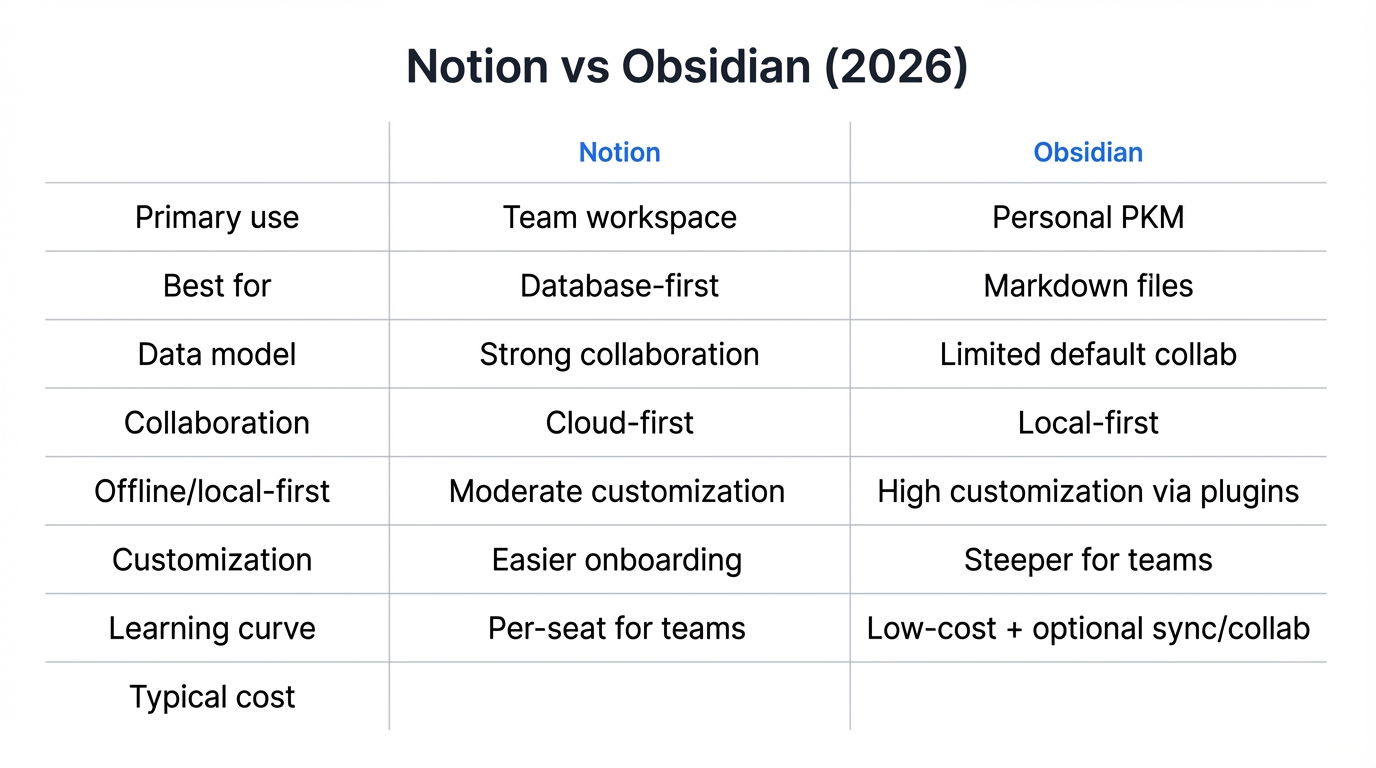 Choose Notion if you:
- work with teams and need shared docs, projects, and structured databases
- want an all-in-one workspace (docs + wiki + lightweight PM)
- value simplicity and “it just works” collaboration
Choose Obsidian if you:
- want local-first, offline-first notes with full control of your files
- care about deep linking, graph-based thinking, and long-term portability
- want maximum flexibility via plugins and markdown workflows
Core difference: workspace vs local-first knowledge base
Notion: collaborative workspace + database-first structure
Notion is optimized for teams and structured content. Its databases, linked views, and permissions make it ideal for documentation and operations.
Typical Notion wins:
- company wiki and SOPs
- project tracking and lightweight CRM
- meeting notes and team knowledge hub
- structured dashboards and reports
Obsidian: personal knowledge system + markdown files on your disk
Obsidian is built around local markdown files. You own the data by default, and you can customize behavior heavily through plugins.
Typical Obsidian wins:
- personal knowledge management (PKM)
- research notes and Zettelkasten-style linking
- writing workflows that require speed/offline
- long-term “future-proof” note storage
Strengths and weaknesses
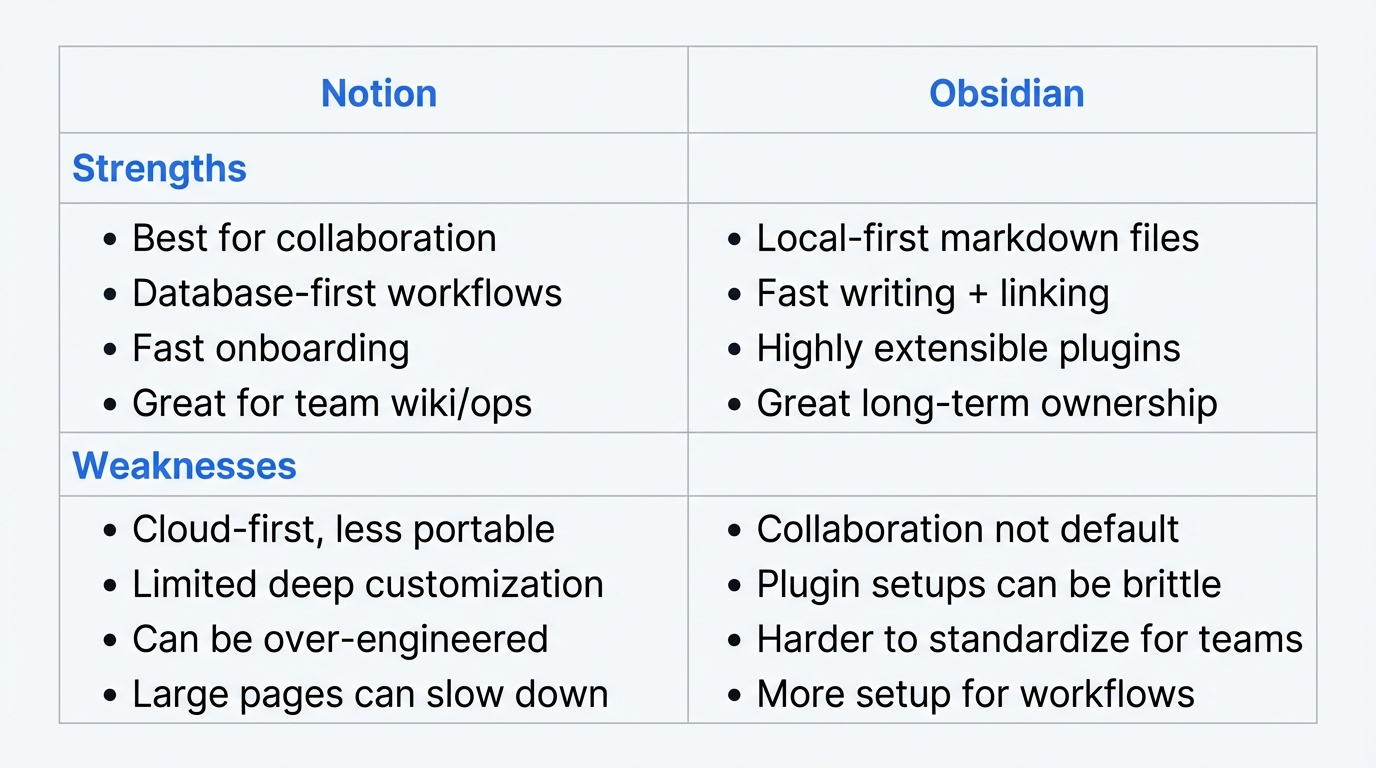 Notion vs Obsidian strengths and weaknesses
Notion — strengths
- Best-in-class collaboration: sharing, comments, real-time editing
- Databases are powerful: filters, views, relations (great for workflows)
- Easy onboarding: most people can start using it quickly
- Strong for teams: wikis, playbooks, onboarding, knowledge hubs
Notion — weaknesses
- Not local-first: you rely on the service and permissions model
- Power-user customization is limited compared to plugin ecosystems
- Complex setups can become “over-engineered” without clear ownership
- Performance can vary with very large pages/databases
Obsidian — strengths
- Local-first by default: your notes are plain markdown files
- Fast and flexible: lightweight editing, powerful linking
- Huge plugin ecosystem: you can shape it into your ideal workflow
- Portability: markdown files remain usable independent of the app
Obsidian — weaknesses
- Collaboration is not the default (can be solved, but requires setup)
- Plugin-heavy setups can become fragile or inconsistent over time
- Teams may struggle with standardization
- Some “workspace” features (databases, permissions, dashboards) require more tooling or conventions
Who is each tool best for?
Notion is best for:
- Teams (startups, departments, cross-functional groups)
- Operators: PMs, BizOps, Chiefs of Staff, Sales/CS leaders
- Anyone who needs: shared docs + structured tracking + permissions
Examples:
- a product team running roadmap + meeting notes + decision logs
- a sales org managing enablement + account plans + playbooks
- an internal wiki + onboarding hub
Obsidian is best for:
- Individuals or small groups who want local-first knowledge
- Writers, researchers, engineers, and power users
- Anyone who needs: offline access + deep linking + long-term control
Examples:
- a researcher building a long-term knowledge graph
- an engineer managing design notes, reading notes, and personal docs
- a creator/writer maintaining drafts and evergreen notes locally
Pricing (what you’ll likely pay)
Pricing changes over time, so treat this as a practical way to think about cost, not a guarantee.
Notion pricing: typically per-seat for teams
- Individuals can start low-cost/free, but serious team usage usually becomes per-seat
- Total cost scales with number of users and plan tier (permissions, admin, security needs)
What to consider:
- team size
- admin/security requirements
- need for advanced permissions or compliance features
Obsidian pricing: app is often low-cost for personal use; extras depend on sync/collab
- Many users run Obsidian with local files at low/no cost
- Costs appear when you want convenience: sync across devices, collaboration, publishing, or premium services
What to consider:
- do you need sync across devices?
- do you need shared vault/team collaboration?
- are you okay managing your own storage (e.g., iCloud/Drive) instead?
Decision framework (use this to choose in 5 minutes)
Ask yourself:
- Is collaboration a core requirement?
- Yes → Notion
- No / optional → Obsidian
- Do you want local-first ownership and portability as a default?
- Yes → Obsidian
- No / not a priority → Notion
- Do you need structured databases for workflows?
- Yes → Notion
- No → either (Obsidian can do it, but usually with more setup)
- Are you comfortable maintaining plugins and personal systems?
- Yes → Obsidian shines
- No → Notion is typically easier to standardize
Recommended setups (best of both worlds)
Many professionals in 2026 use both:
- Notion for team-facing work: docs, projects, shared knowledge, SOPs
- Obsidian for personal knowledge: research notes, reading notes, writing drafts
If you do this, define a simple rule:
- “If it must be shared and operational: Notion.”
- “If it’s personal thinking and long-term notes: Obsidian.”
FAQ
Is Notion better for teams than Obsidian?
In most cases, yes. Notion usually wins for team collaboration, permissions, and shared workflow management.
Is Obsidian better for personal knowledge management?
For local-first PKM and deep linking workflows, often yes. Obsidian is especially strong for individual research and long-term note ownership.
Can I use Notion and Obsidian together?
Yes. Many people use Notion for team operations and Obsidian for personal thinking/writing.
Closing recommendation
If you’re building a team knowledge hub or a lightweight operating system for a company, Notion is usually the stronger default.
If you’re building a personal knowledge system you want to own for the long run—and you enjoy customizing your workflow—Obsidian is hard to beat.
Related reading: